Posts

Android Popup box/Dialog box code example - Java
Image
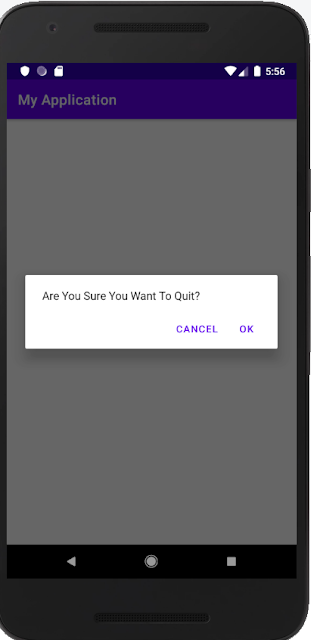
When Developing an Android application, sometimes you want to have confirmation on the action done by the user. Using a popup box or dialog box will help to get the user's intention on what are they doing.  Here is the sample code to use the popup box/dialog box to show a message to the user.  Full Code example. import androidx.appcompat.app.AlertDialog; import androidx.appcompat.app.AppCompatActivity; import android.content.DialogInterface; import android.os.Bundle; public class MainActivity extends AppCompatActivity { @Override protected void onCreate(Bundle savedInstanceState) { super.onCreate(savedInstanceState); setContentView(R.layout.activity_main); } @Override public void onBackPressed(){ ShowMessageExit("Are You Sure You Want To Quit?"); } private void ShowMessageExit(String Message){ new AlertDialog.Builder(this) .setMessage(Message) .setPositiveButton(android.R.str...

How to create DataGrid or GridView in JSP - Servlet

Image
Hi there, today I will like to share my knowledge on creating basic Datagrid in JSP. This is my solution but not a permanent solution in all other cases. Maybe you can enhance this code to achieve your own objective. In this tutorial, I will use basic servlet and JSP. Note: In this tutorial, I will use this library:- MySQL JDBC Driver JSTL 1.1 the project will run on source JDK 7 This is the database table DROP TABLE IF EXISTS `blogtest`.`usersprofile`; CREATE TABLE  `blogtest`.`usersprofile` (   `userid` varchar(30) NOT NULL,   `firstName` varchar(45) NOT NULL,   `lastName` varchar(45) NOT NULL,   `emailAddress` varchar(45) NOT NULL,   PRIMARY KEY (`userid`) ) ENGINE=InnoDB DEFAULT CHARSET=latin1; INSERT INTO `usersprofile` VALUES ('Ahmad','Ahmad','Ahmad','Ahmad@gmail.com'), ('Ahmad1','Ahmad1','Ahmad1','Ahmad1@gmail.com'), ('Ahmad10','Ahmad10','Ahmad10','Ahmad10@gmail.com'), ('Ahmad11...

Cannot Serialize The Data Table - Web Service

System.InvalidOperationException: There was an error generating the XML document. --->  System.InvalidOperationException: Cannot serialize the DataTable. DataTable name is not set. The error will occur when you create a method in web service (.asmx file) with return type " DataTable ". For Example like below:     [WebMethod]     public DataTable test1()     {         DataTable testTable = new DataTable();         return testTable;     } The Example above will lead to the Error " Cannot Serialize The Data Table " This error because the method in WebService tries to return the result of DataTable to the client, but the DataTable does not have their own name. So the quick solution for this error has put the name for DataTable like example : The Solutions      [WebMethod]      public DataTable test1()   ...

Send email from code behind - Kentico Xperience CMS

Overview Sometimes when developing websites you may need to send emails to recipients depends on the scenario. For example, your client wants to have integration with a 3rd party system. So you did an integration and the client want every time the integration failed, send an email to the web editor to check. So how you can achieve this in Kentico Xperience CMS. Create an Email Template. First, you need to have an email template in Kentico Xperience CMS. You can do this by open the Email Template module and create a new template. The steps described in this link .

Sample code to check Kentico Xperience Object alternative form.

Kentico Xperience is a powerful CMS that build from asp.net framework. The CMS have an eCommerce solution, Intranet and collaboration, Online Marketing, and Content management that make Kentico Xperience is the most popular CMS nowadays. In Kentico Objects, you can create alternative forms allow you to create different versions of existing forms. The alternative forms can then be used instead of the default form in the system's administration interface or on the live site. This is the snippet for Kentico version 8.xx to check if the page type has an alternative form. Code Behind 1: public bool CheckIfPageTypeHaveAlternativeForm(string EditFormName,string classID) 2: { 3: bool haveForm = false; 4: if (classID != "") 5: { 6: if (CMS.DocumentEngine.CMSDataContext.Current.AlternativeForms.GetSubsetWhere("FormClassID = " + classID).Count > 0) 7: { 8: var DataInfo = CMS.DocumentEngine.CMSD...

JSON & DataTable in asp.net / c#

Before start you need to convert your json data to c# class. You can achieve this by using online tools like :  http://json2csharp.com/ Go to :  http://json2csharp.com/ Paste your Json data into box and click Generate Button. Copy the code generated and create Class file in your asp.net solution. After finish convert json data to c# class, Copy the code below. Example JSON Data 1: { 2: "name":"apicode", 3: "email": 4: [ 5: "apicode@gmail.com","apicode@gmail.com" 6: ], 7: "websites": 8: { 9: "home_page":"http:\/\/apicode.blogspot.com", 10: "blog":"http:\/\/apicode.blogspot.com" 11: } 12: } JSON Class after converted 1: public class Websites 2: { 3: public string home_page { get; set; } 4: public string blog { get; set; } 5: } 6: public class RootO...

Javascript show clock in webpage example

Image
This example show how to insert clock on the website which is not static clock, but like a digital clock. Script for Creating Clock 1: <script type="text/javascript"> 2: function updateClock() { 3: var currentTime = new Date(); 4: var currentHours = currentTime.getHours(); 5: var currentMinutes = currentTime.getMinutes(); 6: var currentSeconds = currentTime.getSeconds(); 7: // Pad the minutes and seconds with leading zeros, if required 8: currentMinutes = (currentMinutes < 10 ? "0" : "") + currentMinutes; 9: currentSeconds = (currentSeconds < 10 ? "0" : "") + currentSeconds; 10: // Choose either "AM" or "PM" as appropriate 11: var timeOfDay = (currentHours < 12) ? "AM" : "PM"; 12: // Convert the hours component to 12-hour format if needed 13: currentHours = (currentHours ...

How to make request to web service with soap message - asp.net /C#

If you have web services and want to call the web service from your c# code, you can try to use this code example. The code example uses HttpWebRequest to create a request for the web service.  Code Behind HttpWebRequest request = (HttpWebRequest)WebRequest.Create(<web service address>); request.Headers.Add("SOAPAction", "http://tempuri.org/" + <web service method>); request.ContentType = "text/xml;charset=\"utf-8\""; request.KeepAlive = false; request.Timeout = 300000; // - in millisecond. (5 minit) request.Method = "POST"; request.Credentials = CredentialCache.DefaultCredentials; byte[] byteArray = Encoding.ASCII.GetBytes(<data you want to send to webservice>); request.ContentLength = byteArray.Length; Stream s = request.GetRequestStream(); s.Write(byteArray, 0, byteArray.Length); s.Dispose(); ...

Decrypt web.config file - asp.net

Image
This is an example of how to decrypt a web.config file in asp.net. You can refer to this post on how to encrypt web config file. The example will decrypt web config file for 3 section which is ConnectionString, AppSetting, and system.web/authentication. Front End .aspx code <br /> This is button to decrypt web config.<br /> <asp:Button ID="Button2" runat="server" Text="Decrypt Web Config" OnClick="Button2_Click" /> Code behind private static string[] sectionName = { "connectionStrings", "appSettings", "system.web/authentication" }; public static string[] SectionName { get { return sectionName; } set { sectionName = value; } } protected void Button2_Click(object sender, EventArgs e) { //decrypt UnProtectSection(); } /// <summary> /// Decrypted web conf...

Check if web.config file encrypted or not.

This is an example of how to check if the web.config file is encrypted or not. Refer to this article to encrypt and decrypt the web.config file. The example will check the web.config file for 3 section which is ConnectionString, AppSetting, and system.web/authentication. Code Behind private static string[] sectionName = { "connectionStrings", "appSettings", "system.web/authentication" }; public static string[] SectionName { get { return sectionName; } set { sectionName = value; } } /// <summary> /// method to check if web config file is encrypted or not /// </summary> /// <returns></returns> private bool CheckWebConfigIfEncrypt() { bool isEncrypt = false; foreach (string a in SectionName) { Configuration config = WebConfigurationManager. OpenWebConfigu...

Kentico 8.xx - Snippet to check if page type have alternative form name

This is the snippet for Kentico version 8.xx to check if page type have alternative form. Code Behind public bool CheckIfPageTypeHaveAlternativeForm(string EditFormName,string classID) { bool haveForm = false; string strEditFormName = ValidationHelper.GetString(EditFormName, ""); if (classID != "") { if (CMS.DocumentEngine.CMSDataContext.Current.AlternativeForms.GetSubsetWhere("FormClassID = " + classID).Count > 0) { var DataInfo = CMS.DocumentEngine.CMSDataContext.Current.AlternativeForms.GetSubsetWhere("FormClassID = " + classID); foreach (CMS.DataEngine.BaseInfo a in DataInfo) { string formName = ValidationHelper.GetString(a.GetValue("FormName"), ""); if (formName.Contains(strEditFormName)) { haveForm = true; break; } } ...

Encrypt Web.config file - asp.net

Image
This is an example of how to encrypt a web.config file in asp.net. The example will encrypt web config file for 3 section which is ConnectionString, AppSetting, and system.web/authentication. Front End .aspx Code  <br /> This is button to encrypt web config.<br /> <asp:Button ID="Button1" runat="server" Text="Encrypt Web config" OnClick="Button1_Click" /> Code Behind private static string[] sectionName = { "connectionStrings", "appSettings", "system.web/authentication" }; public static string[] SectionName { get { return sectionName; } set { sectionName = value; } } protected void Button1_Click(object sender, EventArgs e) { //encrypt ProtectSection(); } /// <summary> /// Encrypte WebConfig file for certain section /// </summary> /// ...

Delete top N rows & Truncate table data - MSSQL

This example shows how to delete top N rows in MSSQL, where N is a dynamic number. It could be 1000, 100, or 10. ;WITH CTE AS ( SELECT TOP 1000 * FROM [table_name] ORDER BY a1 ) DELETE FROM CTE 1000 is an example number. [table_name] is the table you want to delete a1 is just an example of sort by column a1 Thanks to stack overflow for this help : http://stackoverflow.com/questions/8955897/how-to-delete-the-top-1000-rows-from-a-table-using-sql-server-2008 If you want to delete all table data in the fastest way, you can use the Truncate Keyword.  The example Table name is: Analytics_Compaign TRUNCATE TABLE Analytics_Campaign; /* Reset ID to 1, normally primary key id is auto increment, so when you truncate table data, and when new data insert into database, the id will continue from what it left. This is how you reset the id to number 1 DBCC CHECKIDENT (<tablename>,RESEED,<number to set>)*/ DBCC CHECKIDENT (Analytics_Campa...

How to read JSON Data and convert to DataTable - asp.net / C#

This is an example of how to read JSON Data using C# code. First, before you start coding, please read this post on how to convert JSON data to c# class. How to convert JSON data to Class - C# After finish convert JSON data to C# class, write this code to read your JSON data. Example JSON Data { "name":"swengineercode", "email": [ "swengineercode@gmail.com","swengineercode@gmail.com" ], "websites": { "home_page":"http:\/\/swengineercode.blogspot.com", "blog":"http:\/\/swengineercode.blogspot.com" } } JSON Class after converted public class Websites { public string home_page { get; set; } public string blog { get; set; } } public class RootObject { public string name { get; set; } public List<string> email { get; set; } public Websites websites { get; set; } } ...

How to change the properties/method of one web part from within another web part - Kentico

This tutorial is to show how to access the web part properties/method from another web part. This situation basically when you use a repeater name repeater1 and inside repeater transformation you call another User control/web part name repeater2 . Every time you trigger an event on the repeater2 (ie: click, change the value, etc), you want to refresh the repeater1 value. But you cannot access the properties/method directly. Code Behind repeater / repeater1 Override OnInit Event protected override void OnInit(EventArgs e) { RequestStockHelper.Add("repeater2", this); base.OnInit(e); } Code Behind UserControl / repeater2 Called ReloadData() from another webpart. protected void LinkButton1_Click(object sender, EventArgs e) { CMSAbstractWebPart webpart = RequestStockHelper.GetItem("repeater2") as CMSAbstractWebPart; if (webpart != null) { webpart.OnContentLoaded(); } ...

How to convert JSON to C# Class

Today I found one very good tool to convert JSON data to C# class. Please go to this link:  http://json2csharp.com/ You just paste the JSON data, and it will give you the class for each element in the JSON data. Example JSON Data : Note: This example JSON data from TripAdvisor API. { "address_obj": { "street1": "Lot PTB22819 ", "street2": "Jalan Skudai", "city": "Johor Bahru", "state": "Johor", "country": "Malaysia", "postalcode": "80200", "address_string": "Lot PTB22819 Jalan Skudai, Johor Bahru 80200 Malaysia" }, "latitude": "1.485111", "rating": "4.0", "description": "Staying true to our unique no frills concept, we provide you a good night's sleep at outstanding value. Our hotels come with high quality beds, power showers, 24-hour s...